
Sitemap Generator WordPress Plugin Hits Server Memory Limits
Google (XML) Sitemap Generator Plugin is a popular wordpress plugin which can generate a search engine compatible sitemap of your blog in seconds … but it was leading to Dreamhost to terminating our wordpress scripts and resultant internal server errors.
Internal Server Error Causes
Following investigation into cause of our persistent internal server errors, Dreamhost support kept informing us repeatedly to identify the wordpress scripts which were tripping the server. They said it was due to scripts being stopped by the Process Watcher, as the memory limits were being crossed on the shared server. They advised we should find causes of heavy usage, especially 3rd party plugins which have poor memory management (better to delete than deactivate). Of course they promoted Dreamhost PS with higher memory limits to meet our site requirements.
Sitemap Generator WordPress Plugin and Memory Usage
So how much memory was Sitemap Generator consuming everytime it generated a sitemap of over 3000 urls? Around 25MB!

And to top that it was eating up that much memory every time we edited, deleted or created new articles. That was a setting which is usually enabled to have the most current sitemap.

And when I often tried to rebuild the sitemap manually, I got this error

Basically the script was taking too much memory (from the entire server which also hosts other sites) everytime it generated a sitemap with so many urls and the Dreamhost Process Watcher used to stop the scripts automatically due to your sites going over Memory limits, which basically stopped all WordPress processed till some tech support guy manually released the process watcher and activated the site. It was only thanks to caching that the site traffic sustained despite these errors.
Though this happened several times over the last few weeks, I was able to identify the plugin causing the memory usage spikes only recently. Thereafter I deactivated the plugin. It is obvious that if we need to run this plugin with all that memory usage, it is not possible on shared hosting and you need to upgrade to Dreamhost Private Server where the memory limit is as high as you set it.
Advanced Sitemap Settings
But the sitemaps are essential to let search engines know about your latest urls. The plugin author has created a wonderful FAQ which explains all these issues. Some which relates to us like minit number of posts, Increase server memory limit as well as increase maximum execution time.
Since it is already consuming too much memory, raising the memory or script execution time might not help. So we can continue to use the plugin after limiting the number of posts, which seems like the most practical solution as of now.
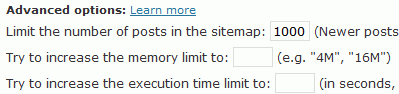
We also upgraded from PHP4 to PHP5 and both these fixes should take care of our internal server errors. Keeping our fingers crossed …
NOTE: The Google (XML) Sitemap Generator plugin is a very useful and highly recommended plugin. This article is for informational purpose to inform that large wordpress blogs will require larger memory to generate sitemaps and sometimes it may be beyond allowed memory limits on shared hosting servers. So either you upgrade to VPS hosting or tweak the sitemap plugins to work on a limited basis.
Get our free weekly email: new tech guides and tools, no spam.
New and updated tech guides, a free tool worth bookmarking and one useful pick, once a week. No spam, unsubscribe anytime.
One email a week. Unsubscribe anytime. See our privacy policy.





How to delete xml sitemap on the google search console? I have two files sitemap make by two app on wordpress. I put it on google search console to index website. Now i want to delete one of two. But i don’t know. Pls, help me or send for me a tutorial.
I think there should be a support to crated paginated sitemaps especially when you have large sitemap (a sitemap having 10’s or thousands of pages).
This is good information. My blog has over 1100 posts and pages, and things were running very badly. Basically I would edit an article and save it. Then when I went to look at the article I would get Internal Server Errors or 404 errors. Sitemap was running while I tried to look at the pages and I ran out of memory and the process monitor killed my process.
What I cannot fathom is why it would take 25 or 33 MB just to create a little XML file. What I might do is write something that runs on my PC, connects to the WordPress database via ODBC, generates the map and then uploads it. I’d also have more control that way too.
Many thanks for this post.
I started having this issue a few days ago and because of this post I now know where most of the memory is being used.
I’m still not sure of the best way round this though. Should I disable the plugin and enable it every now and then to allow a sitemap to be generated? I have several sites using this plugin so adding them all together shows why my memory usage was so high.
Andy
Thanks so much for this post! I have been having the same problems, and didn’t realize this was what was causing the problem until now. DreamHost just told me I was using too much memory, and I didn’t know what was causing it. Thanks!
thanks for this information.
had this issue today. i upped the memory limit and it worked. though, i also complained to Dreamhost that i too have that 90 mb limit, but i am on PS, with way more allotted than 90 mb, so i just emailed them asking that’s up with that.
Great post, I really appreciate this information.
Our site was getting pulled by our host on several occasions and I couldn’t figure out what was causing such large memory spikes. Going through the error log this time I kept seeing googlesitemapgenerator as an issue and found your post explaining this memory usage.
HUGE help. Now I know what my options are. Keep using this plugin and upgrade our server, or find an alternative to this plugin that might not take up so much memory. Given that I doubt I’ll find that and that my site keeps growing, it looks like upgrading might be the reasonable option.
Retroone, your comment is completely wrong.
Great info but i think the problem only on shared server because i has this issues before and my host keep complaining about memory usage..
when i moved to another host they never complained even though the usage was the same but later on they did so had to change the plugin and use differnet one instead of moving to expensive vps hosting,
but overall small shared server hosting company will complain about anything not as the large ones.
thanks again for the info
Hello,
I have a problem with this plugin. The sitemap generated by it for my site has 120 URLs.If i make a sitemap with other software it says 154 URLs. I compared the sitemaps and it looks that this sitemap doesn’t include pagination.Ex:www.abc.com- is included but it doesn’t include http://www.abc.com/q/page/2…www.abc.com/q/page/6.Any idea why? Thanks.
I’ve done a couple XML coding projects in the past and they always seem to use a shocking amount of memory. Is that what is happening with this plugin?
I’ve never noticed that the plugins page in the admin section shows the time and memory used and a bunch of other statuses.
That’s nice for trouble shooting.
there is something wrong also with the latest GD Star ratings.
@Retroone: You need to calm down. No one is trying to deny the value of this plugin. And it’s not that he isn’t allowed to have over 25 MB. If you had read the post and saw the screen shots you would have noted that dreamhost allows 90 MB.
Again, if you’d read the post, you would have seen where the dreamhost tech explained the scripts are terminated due to total usage and not individual. So this site is just the one that happens to tip it over the edge.
My site has only 223 posts and this same plugin reports that it uses 33 MB to generate my sitemap.
The “problem” (if you want to call it that. Frankly, I see this post as merely informative) is that shared hosts overcrowd their servers.
It’s not the fault of the plugin author, not the fault of the blog owner for “his setup”.
@Linn – that is a limitation of shared hosting.
@Tinh – it depends on hiw much memory your host allows and how memory intensive other sites on your server are.
@deuts – VPS is the way to go when the site becomes large. Most excellent plugins will consume too much memory on larger sites.
@zulfikar- this problem is related to site size, as larger sitemaps will require more memory to generate sitemaps.
@Retroone – Firstly this is an excellent plugin. There is no bug in the plugin, so author was not contacted. I agree it is our hosting issue and this article explains how most sites on shared hosting can edit their settings and keep using this essential plugin.
Or, you could have emailed the plugin creator privately, rather than slating his plugin publicly. And it isn’t an “all users would still need to be told” issue, as wp-admin would have alerted them to an update to the plugin. Not to mention the fact that it’s your own setup issue. OR the fact that if you aren’t allowed to use more than 25mb on a running process on a site this big, you need to stop being so stingy and go and get a REAL web host.
Classy work.
I got “Internal server error”. How can I reapir this? I can not lod to admin area of wordpress.
Now there is some insight I was not aware of. Thanks a lot for sharing. I wonder if the problem is persistent to all hosting companies or is it just dreamhost and a handfull others?
Time to investgate the issue further I guess. Thanks for the heads up once again.
Th sitemap plugin is a very useful WordPress plugin. If that is the case as you state here, it means that for old blogs that grew large over time, VPS hosting is really the way to go. That’s where everyone is going to.
Great to know this. I have to doublecheck my blog to see how much memory this plugin used to generate sitemap to avoid this issue. Thanks
that’s fantastic to know.
it’s a pain to have shared host for wordpress bloggers. but it’s what webhosting provided for blogging, they should be able to raise a few bars themselves.. I know shared-hosting is not a best processing power, but web hosting should provide what’s necessary too. I am thinking, dedicated server is the way to go..
great read.