
How to Create Custom AdSense Ad Sizes (2026 Rules)
Standard ad sizes don’t always fit your layout. In December 2013 Google opened custom AdSense ad sizes to every publisher, a feature that was once a perk for premium publishers. You can still create a fixed-size display ad of almost any width and height in 2026, as long as you follow Google’s size rules. Here’s how, plus when a responsive ad is the better choice.
Quick answer: In AdSense, go to Ads > By ad unit > Display ads, choose Fixed instead of Responsive and enter your width and height. Width must be at least 120 px and height at least 50 px, neither can exceed 1200 px, and only one dimension can be over 450 px. Google recommends responsive ads for responsive sites.
Table of Contents
Custom AdSense ad size rules
According to AdSense Help (external site), fixed-size display ads must follow these limits, or they won’t show:
- Minimum width: 120 pixels.
- Minimum height: 50 pixels.
- Maximum width or height: 1200 pixels.
- Only one dimension can be larger than 450 pixels.
In 2013 the rule was stricter: only one dimension could exceed 300 pixels.
How to create a custom size AdSense ad
- Sign in to AdSense and open Ads > By ad unit.
- Choose Display ads and name the ad unit.
- Under ad size, switch from Responsive to Fixed.
- Enter the width and height in pixels, for example 500 x 200.
- Click Create, copy the code and paste it where you want the ad.
The code sets the size in the style attribute, like style="display:inline-block;width:500px;height:200px".
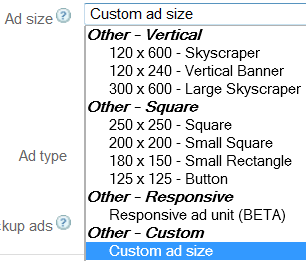
Custom size vs responsive ads
Fixed-size units don’t resize or adapt to screen orientation, so a 728-wide ad will overflow on phones. Google recommends responsive display ads for responsive designs. Use fixed sizes only when you need to fill an exact space, such as a sidebar slot. We tested smart sizing responsive ads around the same time.
Will custom sizes earn less?
Possibly. Fewer advertisers create ads for unusual sizes, so Google may fill them with smaller standard ads or text ads, reducing competition. Some sizes, such as 120×60, have little or no display inventory. Standard sizes like 300×250, 336×280, 300×600 and 970×90 usually attract more bids.
Tips for custom ad sizes
- Pick sizes close to popular standard sizes so more ads can fill them.
- Check performance in AdSense reports after a few weeks and compare with a responsive unit.
- Consider Auto ads if you don’t want to place units manually.
- Follow AdSense ad placement policies; don’t push content below too many ads.
FAQ
What is the maximum AdSense ad size?
Up to 1200 pixels wide or tall, but only one dimension can exceed 450 pixels.
Can I change the size of an existing AdSense ad unit?
Yes, edit the ad unit in AdSense and update the size, then replace the code if needed.
Are responsive AdSense ads better than fixed sizes?
For most mobile-friendly sites, yes. They adapt to each screen and can show more ad formats.
Stuck on a gift? Try our free Gift Idea GeneratorIdeas for anyone by age, job, interests and budget, with Amazon.com and Amazon.in linksFind gifts →Get our free weekly email: new tech guides and tools, no spam.
New and updated tech guides, a free tool worth bookmarking and one useful pick, once a week. No spam, unsubscribe anytime.
One email a week. Unsubscribe anytime. See our privacy policy.


nice article sir
can you tell me the how to use google adsense ad on mobile sites??
Thanx
thanks for this good idea on Adsense ads, i will try it on my site.
really a great explanation well done thanks…for posting this.
thanks for share such a good article, i really don’t know about this tricks. After Reading your article i can use any size of add in my blog.
They finally decided that mobile ad designs were needed by all publishers.
thanks for shairing this to us and thanks for full details about this best ads thank you …………..
custom adsense units are best who want to custom design their websites and want their own sizes ads. adsense make it great.
Hi,
I think this is a great news for the Adsense publishers as it will bring them better ROI. Custom ads are an advantage to the branding.
Thanx for the article. Now i’m easily create my adsense adds how i want
Hi,
Thanks for providing this informative article. I look forward in changing my Adsense Ads to different sizes. I will be using this tips immediately.
This custom feature is great I had not noticed it. Sure I will create some custom size ad unit.
Adsense is not the only tool that we can use to maximize revenue from your online content. There are several tools I must say.
Well anyway, I agree that Google Adsense is an easy way to earn money from your online content, and many are interested with this. So this tutorial is very helpful to newbies. A functional tool that is useful to marketers.
I guess this is a bit of tutorial on how to create adsense ad size. It would be important for marketers to learn of these with regards to the smart sizing responsive ads that were recently launched. A helpful tutorial I must remark!
I was not aware of that. thanks for sharing.